Obsidian: Daily Notes
I love Bullet Journaling. It has added a much-needed structure to my days and helped prevent essential things from falling through the cracks. However, it’s not always easy to switch back and forth to a written journal when my work is all digital. I also wanted a way to track script snippets in my journal so that I could easily copy-pasta later on when I needed to repeat actions from a previous day. I needed a way to digitize some of my daily journal entries without the arduous task of completely duplicating my writing.
Requirements
Plain ol’ vanilla Obsidian wasn’t going to cut it here. The following examples rely on the following plugins1:
- Templater
- Admonitions
- Icon Shortcodes
- Tasks
- Dataview
- Periodic Notes
- Calendar
Creating the files
I use Periodic Notes with Calendar to automatically create daily notes in my vault. The appropriate file is made in the right place by clicking on the current day (or previous days if I need to create retroactive entries). Calendar is essentially a UI for Periodic Notes in this case.
Periodic Notes
The Periodic Notes plugin defines the title of a daily note file (.md). This needs to stay consistent, or you’ll be renaming files later so that the system links properly. I recommend thinking about this part the most at the beginning. Most other settings can be tweaked and refined; this one is essentially immutable.
Date Formats
I changed most date formatting to match the same format in my written journal:
- Daily:
YYY.MM.DD - ddd“2022.07.05 - Tue” - Weekly:
gggg-[W]ww“2022-W28” - Monthly:
YYYY-MM“2022-07” - Quarterly: not configured/enabled; I haven’t found a use for quarterly notes yet
- Yearly:
YYYY“2022”
Templater
Regardless of what creates the daily entry, I want all files in my notes section to have the proper format. To do this, I set folder templates in Templater and trigger Templater on new file creation.
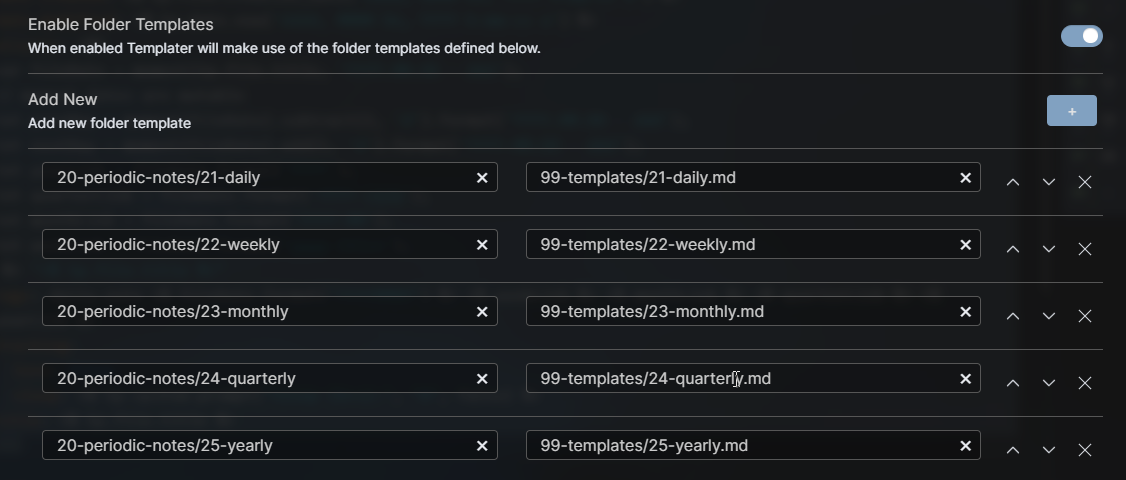
In my vault, all periodic notes are in the 20-periodic-notes directory. There are sub-directories for daily (21-daily), weekly (22-weekly), etc.
Frontmatter
---
date created: <% tp.file.creation_date('dddd, MMMM Do, YYYY h:mm:ss a') %>
date modified: <% tp.date.now('dddd, MMMM Do, YYYY h:mm:ss a') %>
aliases: <%*
var fileDate = moment(tp.file.title, 'YYYY.MM.DD - ddd');
// moment dates are mutable
let prevDay = moment(fileDate).subtract(1, 'd').format('YYYY.MM.DD - ddd');
let nextDay = moment(fileDate).add(1, 'd').format('YYYY.MM.DD - ddd');
let yearLink = fileDate.format('YYYY');
let quarterLink = fileDate.format('YYYY-[Q]Q');
let monthLink = fileDate.format('YYYY-MM');
let weekLink = fileDate.format('gggg-[W]ww');
-%> "<% tp.file.title %>"
tags: daily_note <% fileDate.format("YYYYMMDD") %> <% weekLink %> <% monthLink %> <% quarterLink %> <% yearLink %>
tracking:
  sleep: <% tp.system.prompt("Sleep (hrs):", "0", false) %>
title: <% tp.file.title %>
---
A lot is going on here to set up the meta-information for each daily note.
date created: <% tp.file.creation_date('dddd, MMMM Do, YYYY h:mm:ss a') %>If we start by looking at the first line, the power of Templater gets to show off a bit here.
Full Daily Template
---
date created: <% tp.file.creation_date('dddd, MMMM Do, YYYY h:mm:ss a') %>
date modified: <% tp.date.now('dddd, MMMM Do, YYYY h:mm:ss a') %>
aliases: <%*
var fileDate = moment(tp.file.title, 'YYYY.MM.DD - ddd');
// moment dates are mutable
let prevDay = moment(fileDate).subtract(1, 'd').format('YYYY.MM.DD - ddd');
let nextDay = moment(fileDate).add(1, 'd').format('YYYY.MM.DD - ddd');
let yearLink = fileDate.format('YYYY');
let quarterLink = fileDate.format('YYYY-[Q]Q');
let monthLink = fileDate.format('YYYY-MM');
let weekLink = fileDate.format('gggg-[W]ww');
-%> "<% tp.file.title %>"
tags: daily_note <% fileDate.format("YYYYMMDD") %> <% weekLink %> <% monthLink %> <% quarterLink %> <% yearLink %>
tracking:
  sleep: <% tp.system.prompt("Sleep (hrs):", "0", false) %>
title: <% tp.file.title %>
---

<%*
// ❮❮ ⋮ 2021 › Q4 › 12 › W49 ⋮ ❯❯
// [[path/to/file|display_text]]
let navStr = `[[20-periodic-notes/21-daily/${prevDay}|❮❮]] ⋮ [[20-periodic-notes/25-yearly/${yearLink}|${yearLink}]] › [[20-periodic-notes/24-quarterly/${quarterLink}|${fileDate.format('[Q]Q')}]] › [[20-periodic-notes/23-monthly/${monthLink}|${fileDate.format('MMM')}]] › [[20-periodic-notes/22-weekly/${weekLink}|${fileDate.format('[W]ww')}]] ⋮ [[20-periodic-notes/21-daily/${nextDay}|❯❯]]`;
tR += navStr
%>

# <% tp.file.title %>

## :fas_calendar_check: Agenda

> [!calendar]+
> ![[<% moment(fileDate).format('YYYY-MM') %>#^<% moment(fileDate).format('YYYYMMDD') %>]]

## :fas_list_check:  Tasks

> [!overdue]+
> ```tasks
> not done
> due before <% fileDate.format('YYYY-MM-DD') %>
> ```

> [!unfinished]+
>
>```tasks
> not done
>
> due on <% moment(fileDate).format('YYYY-MM-DD') %>
>
> short mode
> ```

> [!due-soon]-
>
>```tasks
> not done
>
> due after <% moment(fileDate).format('YYYY-MM-DD') %>
> due before <% moment(fileDate).add(1, 'w').format('YYYY-MM-DD') %>
>
> short mode
> ```

## :fas_pen_nib: Notes

- …

^notes-link
I talk more about my setup in a previous post ↩︎